
A flow is a sequence of prompts executed sequentially to create extensive and personalized content with AI. This technique, known as prompt chaining, allows you to link multiple AI templates, where the output of one or more templates is used as input for the next.
Flow Example
Imagine you want to create a blog post. You could design a flow that includes the following steps:
- Generate the article introduction (Introduction Template).
- Create the article outline (Outline Template), using the introduction generated in the first step.
- Develop each section of the outline (Section Development Template), based on the outline generated in the second step.
- Write the article conclusion (Conclusion Template), using the information from the sections developed in the previous step.
- Design images for the article (Image Creation Template), based on the content of the complete article.
Each of these steps is executed as a node in the flow, and the result of each node is used as input for the next.
Executing Flows in AI Content Labs
In AI Content Labs, we chain AI templates and link them through variables. In flows, each step is shown as a node. Besides nodes that represent AI templates, we have other types of nodes, each with its specific settings.
Types of Nodes
- AI Template Nodes: Use predefined or customized templates to generate content.
- Input Nodes: Allow specific data to be entered that will be used in the flow.
- Text Divider Nodes: Split a text into parts based on a divider pattern.
- Image Creation Nodes: Generate images based on descriptions or provided data.
- Fixed Text Nodes: Add predefined text in the flow.
For a detailed description of each type of node and its settings, consult the corresponding section in our documentation.
Advantages of Using a Flow Over a Template
- Mix of Different AI Models: With flows, you can combine different AI models, such as text and image generation models, to get a more complete and varied result.
- Specific Instructions: By breaking down the instructions into more specific points, you reduce the complexity of the instructions given to the AI. This improves the accuracy and coherence of the generated content, as the AI can focus on simpler and more manageable tasks.
- Cost Reduction: Divided and simpler instructions allow using more economical AI models without compromising the quality of the final content.
- Automatic Execution: Unlike manually executing one template after another, flows run all at once, saving time and effort by automating the entire content generation process.
Where to Find Flows in AI Content Labs?
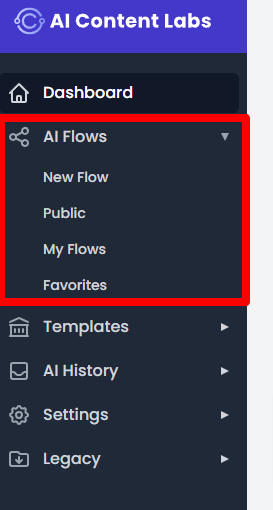
In the side menu of our application, you will find access to the flows section.
Types of Flows
For better organization, flows are divided into 4 sections:
Public Flows
Flows marked as public will be available to all users of our application. This is a great way to share your creations with others.
My Flows
If you like to customize your work, you can create your own flows. All your flows will be available in this section, where you can edit, duplicate, or delete them.
Favorites
Here you will find a list of all the flows you have marked as favorites. It is a quick way to access your preferred flows and use them when you need them.
This structure facilitates navigation through the available flows and ensures that you can use AI efficiently to meet your specific needs.
Conclusion
Using flows in AI Content Labs allows you to make the most of AI’s capabilities, creating complex and detailed content through a series of simple and well-defined steps. This methodology not only improves the efficiency and accuracy of the generated content but also optimizes costs by using more economical and suitable AI models for each specific task. Additionally, the automatic execution of flows simplifies the process, allowing you to get complete results without needing manual interventions at each step.


