
AI templates are tools that help us create specific prompts (instructions) for the AI, obtaining personalized results with a defined format.
Example of a Prompt Template
Here is an example of a prompt template:
"You are an expert in content marketing writing. Your task is to write a {blog_post_type} article aimed at {ideal_customer_persona}. This article should clearly and thoroughly explain the features and benefits of the {product_or_service} to convince readers to make a purchase. Your ultimate goal is to include a strong and persuasive call to action."
This template includes the following parts:
- Instruction: “You are an expert in content marketing writing.”
- Specific Task: “Your task is to write a {blog_post_type} article aimed at {ideal_customer_persona}.”
- Article Objective: “This article should clearly and thoroughly explain the features and benefits of the {product_or_service} to convince readers to make a purchase.”
- Call to Action: “Your ultimate goal is to include a strong and persuasive call to action.”
Variables in Templates
The variables in brackets, such as {blog_post_type}, {ideal_customer_persona}, and {product_or_service}, allow for personalized content generated by the AI. Users enter these values when creating content, adjusting the result to their specific needs.
You can find a large library of free prompts with usage examples for various AI applications in our prompt library. This library covers different categories and topics, facilitating the creation of relevant and high-quality content.
Where to Find Templates in AI Content Labs?
Side Menu
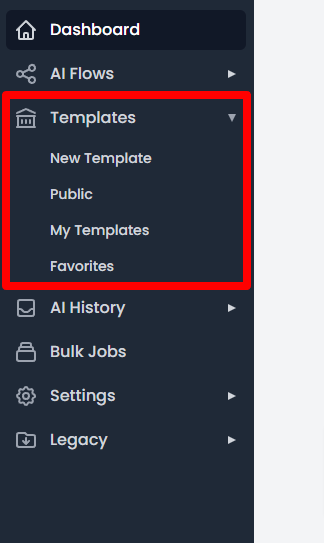
In the side menu of our application, you will find access to the templates section.
Types of Templates
For better organization, the templates are divided into 4 sections:
Public Templates
Templates marked as public will be available to all users of our application. This is a great way to share your creations with others.
My Templates
If you like to customize your work, you can create your own templates. All your templates will be available in this section, where you can easily edit, duplicate, or delete them from the quick menu.
Favorites
Here you will find a list of all the templates you have marked as favorites. It is a quick way to access your preferred templates and use them when you need them.
This structure facilitates navigation through the available templates and ensures that you can use the AI efficiently to meet your specific needs.


