
One of the standout features of templates in AI Content Labs is the ability to configure additional AI settings for greater personalization in the generated results. Below are the available basic and advanced settings.
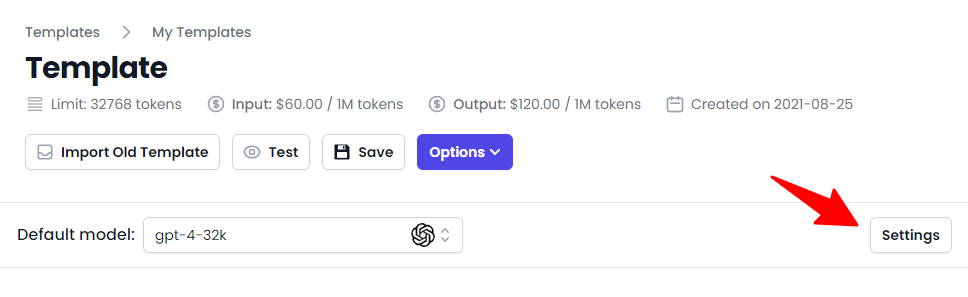
Basic Settings
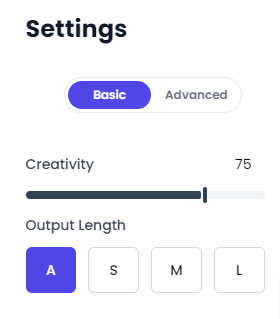
It consists of two parameters: Creativity and Output Length:
Creativity
The creativity level of the generated content can be adjusted according to your needs:
- Low Creativity: More precise, concise, and straightforward.
- Example: If you are writing a technical manual, a low creativity setting will generate content that is direct and easy to follow, focusing on clear and factual information.
- Medium Creativity: Balanced, informative, and descriptive.
- Example: If you are creating a summary of a historical event, a medium creativity setting will provide a detailed and engaging overview, mixing facts with interesting narratives.
- High Creativity: Creative, original, and imaginative.
- Example: If you are writing a science fiction novel, a high creativity setting will generate content filled with innovative ideas, unique characters, and captivating plots, exploring unconventional themes.
You can experiment with these settings to find the one that best suits your purpose.
Output Length
Define the length of the generated content according to your needs:
- Auto (A): The output length will be calculated automatically based on the prompt length and the model’s capacity.
- Short (S): Produces around 100 words. Ideal for brief social media updates, concise email responses, or short product descriptions.
- Medium (M): Around 300 words. Suitable for more extended social media posts, newsletter introductions, or brief product descriptions.
- Long (L): Generates about 750 words. Perfect for short blog entries, moderately long articles, or extensive summaries.
Select the length that best aligns with your needs and project context.
Advanced Settings
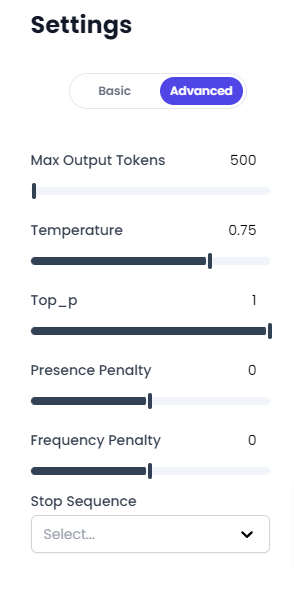
It allows for more precise adjustment of the parameters in AI models, including:
Max Output Tokens
This parameter, known as “max_tokens,” sets the maximum number of tokens the AI can generate in its response. A token can be a piece of text, from a character to a complete word. The total token count, including your prompt and the AI’s response, must not exceed the model’s limit.
The number of tokens influences several aspects:
- API Call Cost: Consider tokens as the ‘currency’ for text generation. The higher the number, the more expensive the call.
- API Call Time: Generating more tokens takes more time. For quick responses, consider a lower number.
- API Call Viability: If you exceed the model’s token limit, the call will fail.
Both input and output tokens count towards these amounts. For example, if your API call used 10 tokens in the message input and received 20 tokens in the message output, you will be billed for 30 tokens.
Usage Recommendations:
- Adjust this parameter according to your needs. If you seek long and detailed responses, use a high value. If you seek quick and concise responses, use a low value.
- Keep in mind that a very high “max_tokens” value can result in excessively long responses that might be challenging to handle or read for users. Conversely, a very low value might result in responses that do not provide enough information or get cut off abruptly.
- Remember to consider the number of tokens in your prompt when setting the “max_tokens” value to ensure you do not exceed the model’s maximum limit.
Temperature
It is a hyperparameter that affects the randomness of the model’s responses.
- High Temperature: The model will be more creative, generating more diverse and surprising responses. However, there is a higher chance of responses being less coherent or relevant to the input prompt. A high temperature value can be useful for brainstorming tasks or when seeking to generate innovative ideas.
- Low Temperature: The model will be more deterministic and cautious. Responses will focus more on the most likely words or phrases given the input. This generally results in more predictable and coherent responses but can be less creative. A low temperature value can be useful for tasks where accuracy and relevance are more important than creativity.
- Intermediate Temperature: Provides a balance between coherence and creativity. It is useful when a bit of both elements is desired.
For example, if you are generating a poem, a high temperature can help you get more original phrases. On the other hand, if you are generating text-based responses, a low temperature will probably give you more accurate answers.
Usage Recommendations:
- Adjust the temperature according to your specific use of the AI. If you want more creativity, try higher temperatures. If you want more coherent and predictable responses, use lower temperatures.
- Remember that even at low temperatures, the AI can sometimes generate unexpected responses. These models are probabilistic, meaning there is always some randomness in their responses.
- Experiment with different temperatures to find the balance that works best for your particular application.
Top_p
Known as ‘nucleus sampling,’ this hyperparameter controls the diversity of responses by selecting a subset of possible tokens for the next word:
- High Top_p: Considers a wide range of possible words, increasing the creativity of responses.
- Low Top_p: Restricts the selection to a smaller group of words, resulting in more predictable and coherent responses.
- Intermediate Top_p: Balances diversity and coherence.
Usage Recommendations:
- Adjust the Top_p value based on whether you seek greater creativity or coherence.
- Avoid adjusting both Top_p and temperature simultaneously, as they both affect the randomness of responses and could complicate the interpretation of results.
Top_k
Top_k is a technique used in AI text generation to limit the token options the model can choose from when generating text. With Top_k, the model sorts all possible next tokens by their probability and only considers the ‘k’ most likely tokens for the next step of generation. This means that the probabilities of any token below the k-th most likely are discarded.
The effect of this is that it reduces the likelihood of the model generating off-topic responses, thus improving the coherence of responses. However, it can also limit the model’s creativity, as some less probable but potentially interesting or relevant tokens are discarded.
For example, if you set Top_k to 40, the model will only consider the 40 most probable tokens for the next step of generation.
Usage Recommendations:
- Use Top_k to improve coherence. A higher value allows more diversity, while a lower value guides responses more restrictively.
- Experiment with different values to find the right setting for your needs.
- A Top_k value of 0 means this parameter is ignored, and the model will generate responses based solely on the probability of each token, without additional restrictions.
Presence Penalty
Presence penalty is a hyperparameter used in AI text generation that penalizes or rewards tokens based on whether they have already appeared in the text. It is a penalty or reward that incentivizes the AI to move on to new topics or stick to those already mentioned.
- High Presence Penalty: The model will have a strong penalty for repeating words or points, leading it to generate responses with a wide variety of words and topics. This can be useful when you want diversity and creativity in text generation.
- Low or Negative Presence Penalty: The model will have a low penalty or even a reward for repeating words or arguments, leading it to generate responses that may repeat certain words or topics. This can be useful when you want the model to stick more to certain topics or when you want to incentivize redundancy to emphasize a point.
Usage Recommendations:
- Adjust the Presence Penalty value according to your needs. If you seek diversity and new topics in text generation, use a high value. If you seek redundancy and adherence to certain points, use a low or even negative value.
- Keep in mind that a very high value can reduce coherence, as the model might be overly incentivized to move on to new topics and words. Similarly, a very low or negative value can result in excessive repetition of words or topics.
Frequency Penalty
Frequency penalty is a hyperparameter in AI text generation that penalizes tokens based on how often they have already appeared in the text. The more often they appear, the more they are penalized. This decreases the likelihood of the output repeating itself verbatim.
- High Frequency Penalty: The model will have a strong penalty for repeating words that have already appeared multiple times, leading it to generate responses with a wide variety of words and topics. This can be useful when you want diversity in text generation.
- Low or Negative Frequency Penalty: The model will have a low penalty or even a reward for repeating words that have already appeared multiple times, leading it to generate responses that may repeat certain words. This can be useful when you want to incentivize redundancy to emphasize a point.
Difference from Presence Penalty:
While Presence Penalty penalizes or rewards words simply based on whether they have already appeared in the text, Frequency Penalty considers how many times they have appeared. This means that Frequency Penalty will more strongly penalize words that are frequently repeated, while Presence Penalty will apply a fixed penalty or reward regardless of how often the words appear.
Usage Recommendations:
- Adjust the Frequency Penalty value according to your needs. If you seek diversity in text generation, use a high value. If you seek redundancy, use a low or even negative value.
- Keep in mind that a very high value can reduce coherence, as the model might be overly incentivized to avoid repeating words. Similarly, a very low or negative value can result in excessive repetition of words.
Stop Sequence
Stop Sequences or “stop_sequences” are sequences where the AI will stop generating additional tokens. These are strings of text that, when recognized in the text generation, make the model stop. This can be useful for controlling the length of the generated output or stopping the generation when a certain point is reached.
For example, you can use a period (‘.’) or a specific phrase (‘End of report’) as a stop sequence. When the model generates one of these tokens, it will stop.
Usage Recommendations:
- Use stop sequences to control the length and content of the generated outputs. If you know a certain phrase or character should mark the end of a response, use it as a stop sequence.
- Remember that the model must ‘see’ the stop sequence in its generation for it to work. If the stop sequence is very long or unusual, the model might not generate it and thus not stop the text generation.
- While it is possible to specify multiple stop sequences, it is not necessary to use all of them. If you only need one stop sequence, that is perfectly acceptable.
Conclusion
Not all models have all parameters available for configuration. According to the default model you choose, you will have the available parameters.
This guide will help you understand and use the different settings available in AI Content Labs templates. By adjusting these parameters, you can personalize and optimize the AI’s performance to meet your specific needs, ensuring that the generated content is relevant, coherent, and suitable for your purpose.


