
To create a flow in AI Content Labs, follow these steps:
- Go to the side menu.
- Select the “AI Flows” section.
- Click on the “New Flow” option.
Flow Creation Interface
The flow creation interface has 4 sections:
Top Options Menu
In the top menu, you will find buttons to create and manage the flow, including options to:
- Add nodes.
- Test the flow.
- Import flows from the Legacy version of AI Content Labs.
- Add the general information of the flow.

Editing Canvas
In the central part, there is the canvas where the nodes, connections, and AI models to be used in the flow are displayed. Here, you can visualize and edit the sequence of steps that will make up your flow.

Side Panel
The side panel is not shown by default; however, it opens to show additional settings for the nodes and to fill in the general information of the flow when you click on the pencil button.
Flow Information
By clicking on the pencil button in the top menu, you can enter the following flow information:
- Title: The title of the flow.
- Categories: Assign the flow to the available categories.
- Language: Indicate the main language of the flow.
- Short Description: Add a brief description for the flow that informs the user about what it does.
- Full Description: Explain in detail how the flow works and add examples or usage instructions. Supports Markdown format.
- Status:
- Private: Only available to you.
- Public: Can be used by the community.
- Draft: Not available for use.
- Open Source: Only available for public flows. If marked as Open Source, it will not only be available to all users but also duplicable (you can see all the flow content).
- Video Link: Optional, add an informative YouTube link about your template.
Example 1:
Next, we will create a simple flow to create a business plan from the company name, company description, and target market.
For practical purposes, the business plan will include a detailed section describing the company, a marketing and sales strategy, and a financial planning section.
Flow Sequence
To produce this business plan, we will use the following sequence:
- Generate an Executive Summary: This summary will cover all parts of the business plan and help maintain coherence throughout the report. This result will not be visible in the final report; it is just for reference.
- Generate the Detailed Company Description: Using the initial information and the executive summary generated.
- Perform a market analysis: Using the executive summary and the initial data.
- Create the Marketing and Sales Strategy: Based on the initial information and the executive summary.
- Develop the Financial Planning Section: Also based on the initial information, the executive summary, and the marketing and sales strategy.
Create the Flow in AI Content Labs
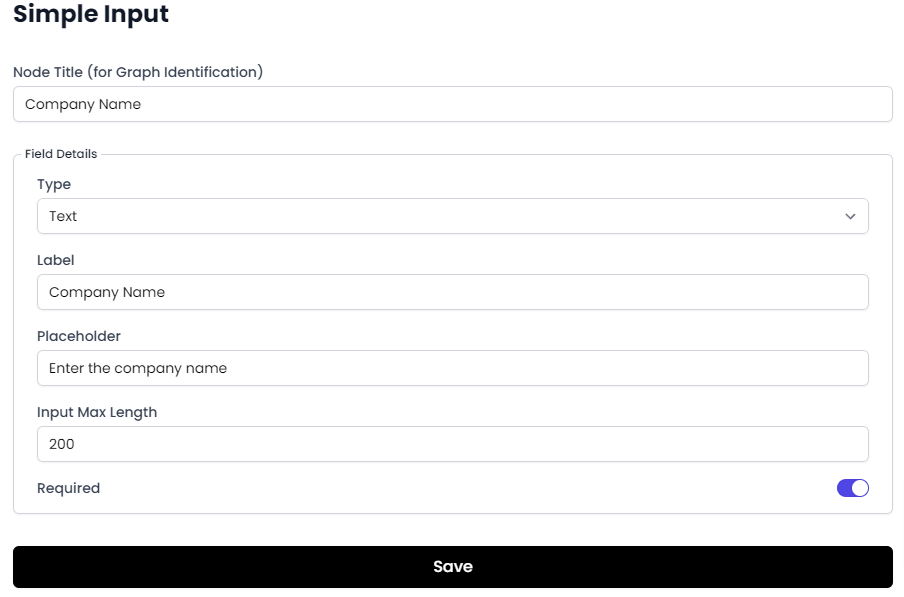
First, we will create the three inputs:


Now we will create the AI templates:


The prompts used in each template are:
Executive Summary:
You are an experienced business consultant. Your task is to write an executive summary for the company {company_name}. The company is dedicated to {company_description} aimed at the target market: {target_market}. The summary should include a brief description of the company, its main objectives, and an overview of its target market and products or services. Additionally, a summary of the marketing and sales strategy and the financial plan. Make sure it is clear and concise, as this summary will be the basis for creating a complete report.
Detailed Company Description:
You are an expert in writing business plans. Your task is to write a detailed description of the company {company_name}.
Refer to the following executive summary:
### EXECUTIVE SUMMARY:
{executive_summary}
###
The company is dedicated to {company_description} and is aimed at the target market: {target_market}.
The description should include ONLY the company's mission, vision, history, and values. Make sure it is informative and attractive to potential investors.
Market Analysis:
You are a market analyst. Your task is to write a market analysis for the company {company_name}.
Refer to the following executive summary:
### EXECUTIVE SUMMARY:
{executive_summary}
###
The company's target market includes {target_market}. The analysis should include a market description, market size, current trends, and a competitive analysis. Make sure to provide relevant data and statistics.
Marketing and Sales Strategy
You are a marketing specialist. Your task is to write a marketing and sales strategy for the company {company_name}.
Refer to the following executive summary:
### EXECUTIVE SUMMARY:
{executive_summary}
###
The strategy should be aimed at the target market of {target_market} and should include the following aspects: product positioning, pricing strategies, distribution channels, and promotional tactics. Make sure the strategy is coherent and effective.
Financial Plan
You are a financial expert. Your task is to write a financial plan for the company {company_name}.
Refer to the following executive summary and the marketing and sales strategy:
### EXECUTIVE SUMMARY:
{executive_summary}
### Marketing and Sales Strategy:
{marketing_sales_strategy}
###
The plan should include a projection of income and expenses, a break-even analysis, and a projected cash flow for the next three years. Make sure the plan is detailed and realistic.
Finally, we link all the nodes in the flow:

To hide the output of the “Executive Summary” node, simply click on “Output Settings” and in the side panel, activate the “Hide Output” option.

Testing and Saving the Flow
Once the flow is completed, you can test it with the test button located in the top menu. Here you can see how the flow is executed step by step.


If everything is in order, save the template for use.
Note: When testing the flow, image nodes will only show the prompt, not the generated image (to save credits). Similarly, for text divider nodes, only the first two will be processed. The purpose of the test is to check the flow’s functionality, so these simplifications are made to save tokens for the user.
If everything is correct, save the flow for use. The example flow is available at: https://app.aicontentlabs.com/flows/Tlgf5jek8ZRGIOsIKZm4r.


